
Translation services and custom models
Configure translation services and custom AI models under Settings → Network & connections. Dedicated translation endpoints translate text; vision models that accept image input can also handle image conversion, tables, and formulas. Obtain the provider's address, authentication details, and model ID first.
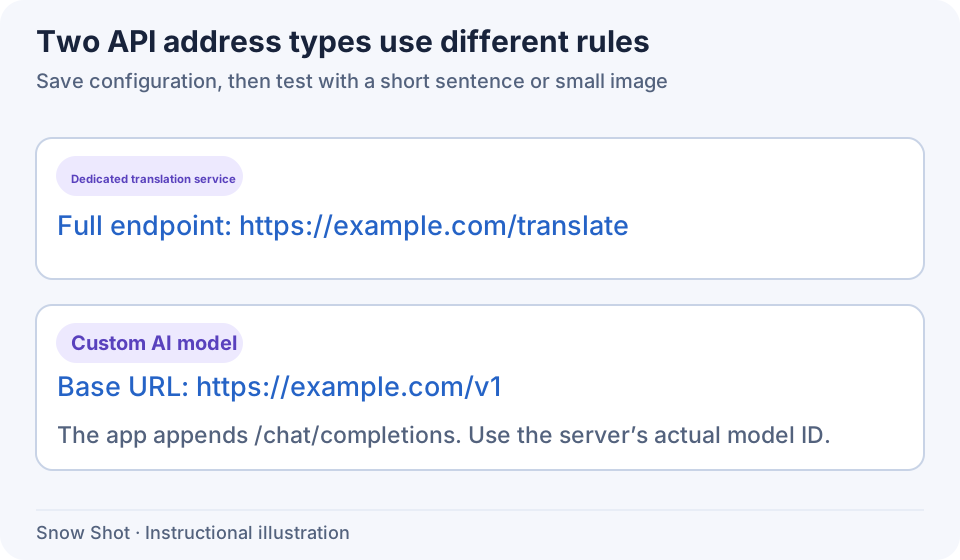
Instructional illustration. The two URL formats follow different rules.
Add a dedicated translation configuration
- Open Settings → Network & connections → Translation services and click Add configuration under Translation configurations.
- Enter a recognizable Configuration name and select DeepL, DeepLX, Baidu, or Youdao under Service format. The format determines the request protocol and must match the real endpoint.
- Enter the provider's complete translation endpoint in API URL, retaining any required path and query. Snow Shot does not add an endpoint path for you. Do not guess it from the service homepage, embed credentials, or add a
#fragment. - Supply the API key required by DeepL / DeepLX. DeepLX's optional token is sent as a Bearer token. Baidu and Youdao use their respective Application ID and Application secret; the form shows fields for the selected service.
- Set Concurrency from 1–16. This is the configuration's shared simultaneous-request limit across translation tasks. Reduce it when the service rate-limits requests.
- Click Save. Once the configuration appears in the list, select it under Translation service on the translation page and test a short sentence to confirm a real request succeeds.
Add a custom model
- Under Network & connections → Custom AI models, click Add model in Custom models.
- Enter a display Model name and an OpenAI-compatible Chat Completions base URL in API URL. Snow Shot appends
/chat/completions; do not include that path twice. - Enter the API key and API model. Type the provider's exact model ID, or expand the list to try fetching models. You can enter a known ID manually if fetching fails.
- Enable Vision support only when the remote model actually accepts images. This switch cannot give a text-only model image understanding.
- Select Provider type—OpenAI, Qwen, DeepSeek, or Doubao—to match reasoning controls to the interface. With OpenAI, the model controls reasoning and the Reasoning support switch is unavailable. Other types can explicitly configure reasoning using the available options.
- Set Concurrency to 1–16 and click Save. Select the model on the translation page to test text, then use image conversion to test image support.
Base URL validation requires HTTP or HTTPS and rejects embedded credentials, queries, and fragments. Keys must not contain line breaks. Names must not duplicate an existing configuration. Resolve field messages before saving.
Edit configurations and troubleshoot connectivity
- Click Edit on the intended row. Change the fields and choose Save, or use Cancel to close the form without saving its editing draft.
- Copy immediately adds a separate item with a copy suffix, retaining the original address, credentials, and options. It does not first open an editing form. Find the copy, edit and save its new values, then select the intended configuration in your translation task.
- Delete opens a confirmation naming the item. Cancel keeps it; confirming removes it. If it was selected, another available option is used. Recheck the task's service and retry. Resolve a deletion error before attempting again.
The server address under Snow Shot server applies to built-in online services; clearing it restores the default. It is separate from a custom model's API URL. Changing it does not change the application update source.
This configuration feature requires Full. Mini does not provide these translation and API configuration entries.
Continue with Screenshot translation, Text translation, Image conversion, or Table recognition.